
Managing the featured speaker list
Last modified: 21 May, 2024
The featured speaker list is not synchronized with BNI connect and will need to be updated from BNI+. This is easy and will allow BNI+ to automate everything to deliver a seamless meeting.
To browse and edit the featured speaker list, go to Meeting > Speakers. You can also delegate management of the speaker list to a member by going to Chapter > Settings. Managing member(s) will receive emailed notifications with links to this same view.
The speaker list can be updated in a list view or grid view.
| Planner View offers a more fluid view that also permits moving speakers between dates. This is achieved from the navigation that appears to the left of the date when hovering. | 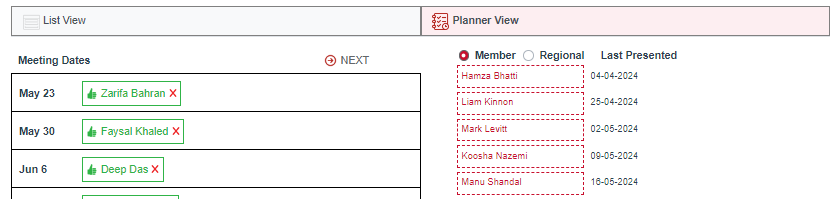 |
The featured speaker experience
A typical meeting will have one or two featured speakers. Speakers are usually members or regional contacts. Add a new speaker by selecting a member, a regional contact or other person. Once added, BNI+ does the rest:
- Featured speakers for the next meeting date will receive email notifications to setup their bio and presentations
- The member or regional contact will upload their file(s) and set their bio.
- BNI+ will show the status of the featured speaker on your HOME view
- The bios and presentations are a click away for the president to seamlessly launch during the meeting delivery.
In addition to automating the speaker preparations you can also highlight the upcoming speakers in your slideshow and newsletter.
Related Topics: