
Regional slide settings
Last modified: 15 May, 2024
Slide settings can be accessed by selecting the slide in the agenda. The regional slide settings will affect all chapter slide settings.
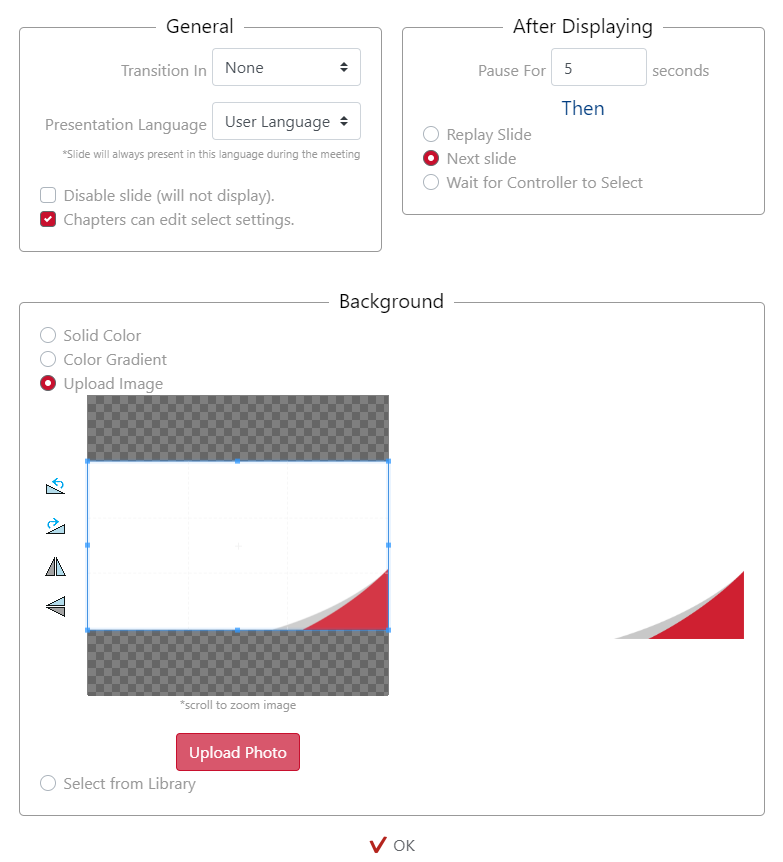
From the Slide Settings pop-up:
General – Slide transition type and language can be determined by the region here. The slide may also be disabled for all of the chapters and the ability for chapters to edit the slide can be enabled/disabled here.
After Displaying – Here the region can control the time for slide display as well as autoplay and manual slide progression options.
Background – The region can alter the slide background for all of the chapters in that region. Choices are a solid colour, a gradient of two colours or an uploaded image. The BNI online uploaded image is the initial default for the majority of the slide deck.