
Planning with the meeting agenda
Last modified: 12 September, 2024
The agenda is the main planning tool for the meeting. It provides an overall view of the meeting, its sections, time allocations, slide visibility and an overall timeline.
Access the agenda by clicking to Meeting > Agenda. The diagram below explains many of the indicators and icons.
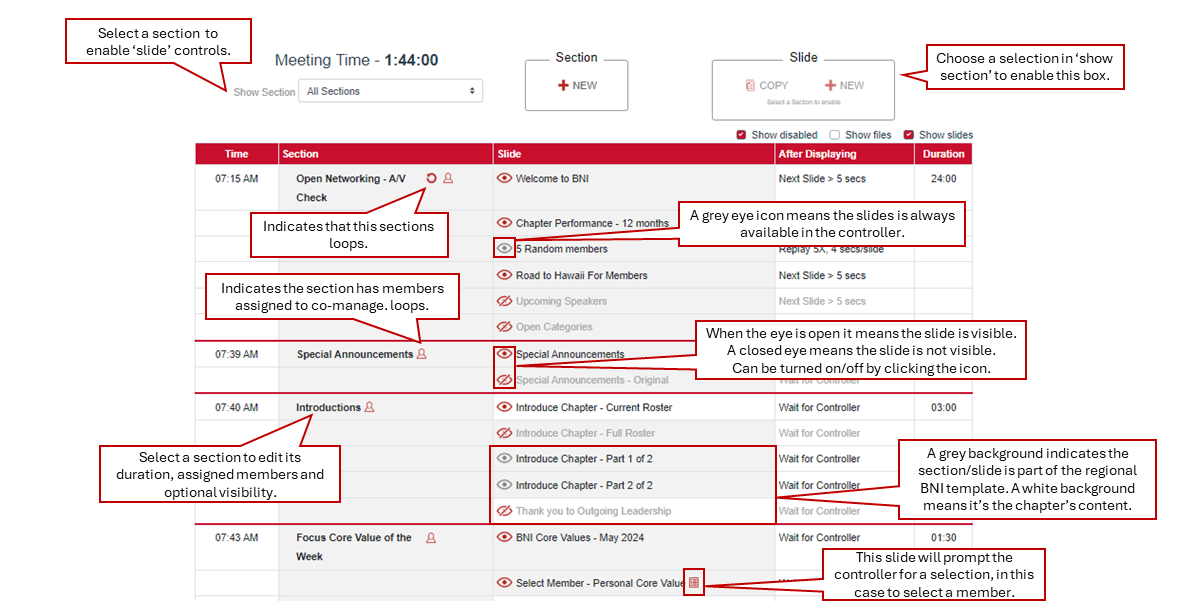
The region sets the master agenda for all chapters. The region’s sections and slides will appear grayed in the agenda of a chapter.
Chapters can add their own slides or insert a section as required. The chapter’s slides can be dragged and re-ordered within the agenda, but the region’s sections and slides cannot be moved. Once a meeting section is created, it will appear in the bottom row of the agenda.
|
Chapters can set the visibility of some optional sections and most of the slides.
The agenda planning checklist
Below are recommended steps to plan your meeting with the agenda:
- Scan the agenda and review the time allocations for all sections of your meeting. You can turn off the Show slides option to make this easier.
- Enable/disable optional sections such as Network Leader or New and/or Renewing Members. If you are including these sections, make sure that you have selected members (from Recognition) for these awards.
- Check to make sure all the slides you want are visible and can be selected from the controller.
Related Topics: