
Variables
Last modified: 22 November, 2024
Variables are text references to information that is available to BNI+. This information can be displayed on a slide or included in the script.
For example, the variable {Members_President} returns the name of president of the chapter.
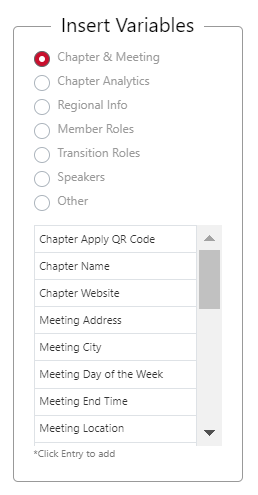
Variables can be browsed from the categorized selector found when editing the script of a section or a text element of a slide. |
 |
Special Variables:
Most variables are used to convey key values and roles. There are however a few variables that return info that you may wish to include in your script or slides. These are listed below:
|
Variable name |
Description |
|
{Categories_Wanted} |
A list of the Open Categories defined by the chapter. |
|
{Categories_Wanted_Random} |
A random list of the Open Categories defined by the chapter. |
|
{Visitors_Today} |
A list of the substitutes attending today’s chapter meeting. |
|
{Subs_Today} |
A list of the substitutes attending today’s chapter meeting. |
|
{Chapter_Apply_QRCode} |
A QR Code of the Chapter’s membership apply URL degined in the settings. |
|
{Upcoming_Speakers} |
A table showing date and names of upcoming featured speakers. |
Related Topics: