
Regional general settings
Last modified: 15 May, 2024
BNI+ provides simplified regional administration. It is important to note that any changes to regional settings, agenda, script and slides will affect all chapter settings in the region.
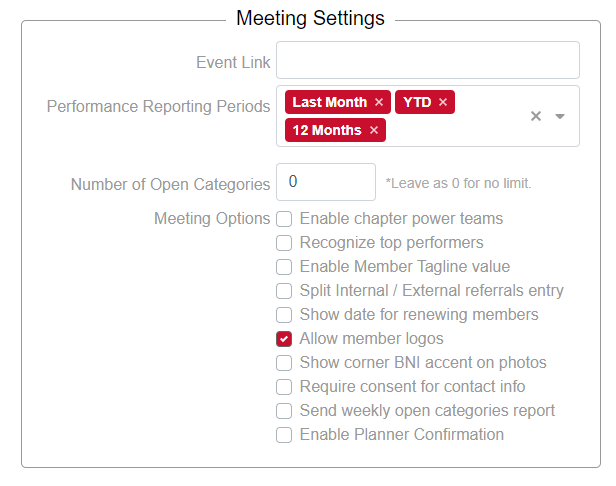
Meeting settings: Various meeting settings can be determined for the chapters at the discretion of the region.
|
Event Link - Paste the event link to the regional event calendar for BNI in the Event Link text box. This link will be used in the event notification email reminder sent to chapter members. Regions can choose one or more of the performance reporting periods available to the chapters from the drop-down menu. Number of open chapter categories can be limited by the region. Enter “0” to show all open categories. This is the default. RST presentations are often longer than regular chapter presentations. The region can set the RST presentation length here. Additional meeting options to note: Regions are able to determine if chapters recognize top performers with an additional banner by selecting “Recognize top performers” in the Meeting options list Regions can determine if chapters split internal and external referrals or if they display a combined number. Regions can ensure consent is obtained for contact information here. Regions can determine if visitors can upload a photo for their introduction in this section. |
 |
| A tagline, a logo and a renewal date can be enabled to display for chapter members. |  |
| The BNI accent is optional on photos and can be selected here. |  |
Social Media Channels – Regions can include social media links that will appear in the chapters newsletter by using the drop-down menu in this section.