
Using and controlling timers
Last modified: 14 May, 2024
The president enjoys complete control of the timers during the meeting.
Timers are displayed in several parts of the meeting when someone is speaking. They can appear as text counters or progress bars during:
|
  |
| The time allocated to each of these cases is set from the Chapter > Settings view | 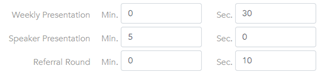 |
 |
When a timer is displayed on-screen, the president will see an icon that will toggle the timer ON/OFF. |
Tapping the icon will pause or restart the clock.
Re-selecting the member/visitor will reset their time and start over.
Note: Timers usually have a build in delay of a few seconds before they start the countdown. This is intentional and allows the speaker time to unmute and begin.
When time runs out:
- The timer will play a repetitive audio chime when time runs out.
- Tap the timer to stop the chime. You can restart the chime by tapping again.
Related Topics: