
Member profile in the meeting
Last modified: 21 May, 2024
Members can directly update their photo/logo, contact info and the newsletter weekly roles requests and referrals with BNI+.
Members receive an email from BNI+ with a link that provides access to that member’s content profile. No login is required when using this link.
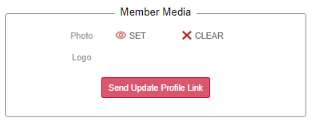
There are three ways to access the content admin link:
- From the BNI+ login page
- Member enters their email and will receive an email containing the content admin link.
- Chapter leadership sends a link to the member directly
- During the initial setup/import of the chapter
- On demand by selecting the member and then selecting Send Update Content Link .
- From their chapter newsletter
- Selecting a link at the bottom of the newsletter.
Note: Startup chapters do not allow applicants to manage their content. Content management is reserved for chapter members.
The member content setup view
Members can access their Member Content Set-Up page with the link provided and from here they can their update Contact Information, Photo, Logo or Weekly Request and Referral information.
Members can manage email subscriptions by selecting Subscription in the Contact Information section.
The updated Weekly Request and Referral will appear in the chapter newsletter.