
Other chapter settings
Last modified: 17 May, 2024
Access additional meeting settings through Chapter > Settings. These Meeting Settings combine a collection of options related to the weekly meeting.
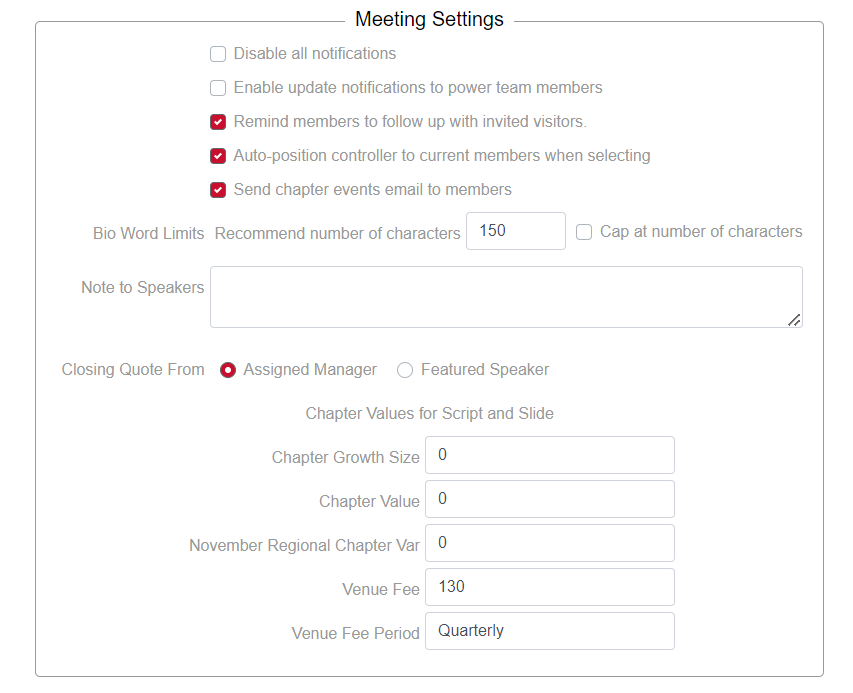
- Disable all notifications - will turn off all notifications to members and should only be used during initial testing or setup of a chapter.
- Remind members to follow up with invited visitors – will email all members who invited visitors to follow up with their attending visitors regarding their experience.
- Auto-position controller to current members when selecting – for larger chapters, this feature will auto-move the member list making it easier to select members.
- Send chapter events email to members – this option will send an email summary to members once a week.
- Send speaker download emails to members – this option enables a dedicated email with any downloads that were provided by featured speakers. It should be turned off if featured speakers are included in the newsletter.
- Send section download emails to members - this option enables a dedicated email with any section speaker downloads. It should be turned off if section speakers are included in the newsletter.
- A recommended bio # words is shown and the bio can optionally be capped at a maximum number of words.
- The Note to Speakers is added at the end of the notification they receive to setup their presentation. It also provides an opportunity to remind them of a door prize.
- The Closing quote can be set by the member manager or featured speaker(s).
- Chapter-Specific Script Values are values that are referenced in the meeting script.
Social media settings
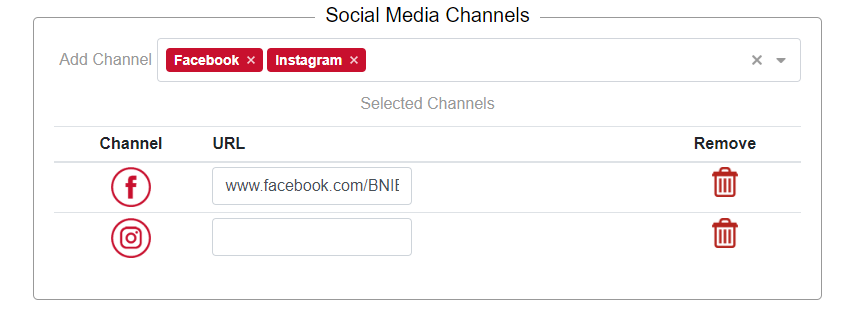
One or more social media links can be defined for the chapter. This can include Facebook, Instagram, or LinkedIn.
The links can be included in the chapter newsletter.
Related Topics: