
Email Delivery and the Log
Last modified: 21 May, 2024
BNI+ utilizes a best-in-class email delivery service that ensures the highest reputation levels of all their servers.
All notification emails are logged, and their delivery status is tracked.
You can view the email log to see if emails were delivered to members. To see the list, go to Admin > Email Log.

Here are some common reasons email delivery can fail:
- Invalid email address – the users email address is incorrect
- Soft bounce – user’s mailbox is full or blocked by the service provider
- Spam blocker – some spam protection tools may block emails. Users who have trouble should specifically allow emails from BNI+.
Member email subscription settings
Some emails that members receive may be opted out of. These are:
- featured speaker presentation downloads
- section speaker presentation downloads
- chapter events
- chapter newsletter
| Members can unsubscribe to any of these four notifications by deselecting them from the Subscription settings of their Member Content Set-up. | 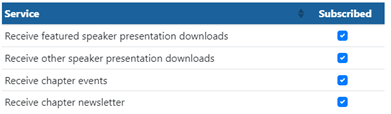 |
The member’s content setup can be accessed from a link at the bottom of the newsletter, the BNI+ login page or when manually requested by leadership.
Related Topics: